
How to redeem Points?

Silo Rewards points provide additional value from eligible Silo account activity, including stock and ETF holdings and uninvested cash balances. Once points are available for redemption, you can redeem them for cash, use them through the Silo travel portal for eligible flights and hotels, or transfer them to participating airline loyalty programs.
Points are valued at 1 cent per point for cash and eligible Silo travel portal redemptions, meaning 100 points = $1. Silo's first airline transfer partner, Avianca LifeMiles, is now live, allowing eligible members to transfer Silo Points at a 1:1 ratio. The redemption value of transferred airline miles may vary.
The number of points you can earn depends on your Rewards Membership Tier, eligible stock and ETF holdings, eligible cash balances, applicable earning rates, annual point limits, and the terms of your Silo Rewards Agreement. Cash earning rates are variable and may change based on prevailing market interest rates, including the federal funds rate.
1. What Can I Redeem My Points For?
Eligible Silo Rewards points can currently be redeemed in three primary ways:
- Cash: Redeem points at 1 cent per point and transfer the proceeds to an eligible linked bank account.
- Travel: Use points through the Silo travel portal toward eligible flights and hotels at the applicable redemption rate.
- Airline Transfer Partners: Transfer eligible Silo Points to participating airline loyalty programs. Our first transfer partner, Avianca LifeMiles, is now live with a 1:1 transfer ratio, meaning 1,000 Silo Points can be converted into 1,000 LifeMiles.
Travel availability, redemption values, and transfer options may vary and are subject to the terms of the applicable redemption program.
Additional airline and hotel transfer partners may become available in the future.
2. How Do I Redeem Points for Cash?
To redeem your points for cash:
- Log in to your Silo Markets account.
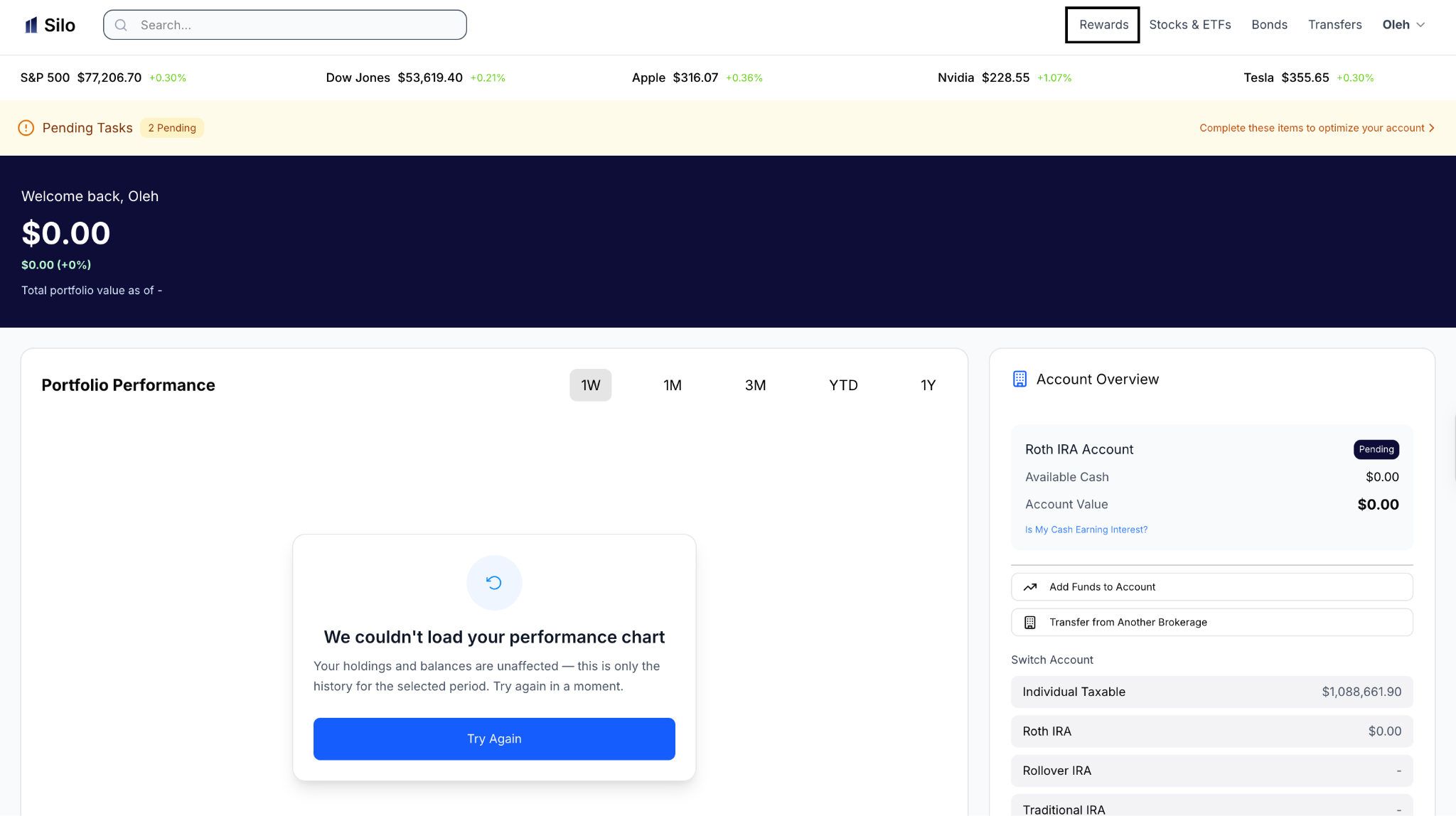
- Go to the Rewards section.
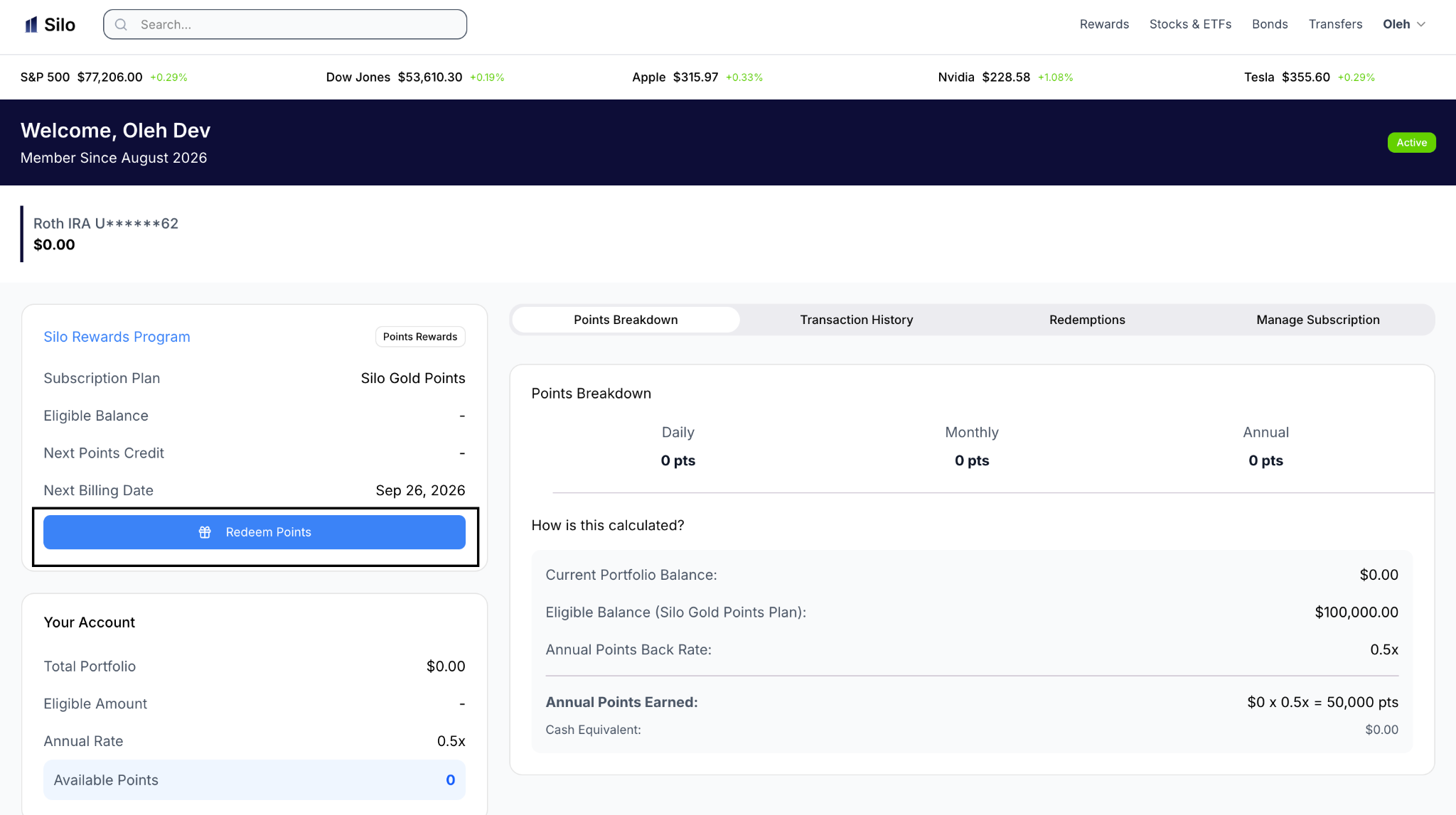
- Select Redeem Points.
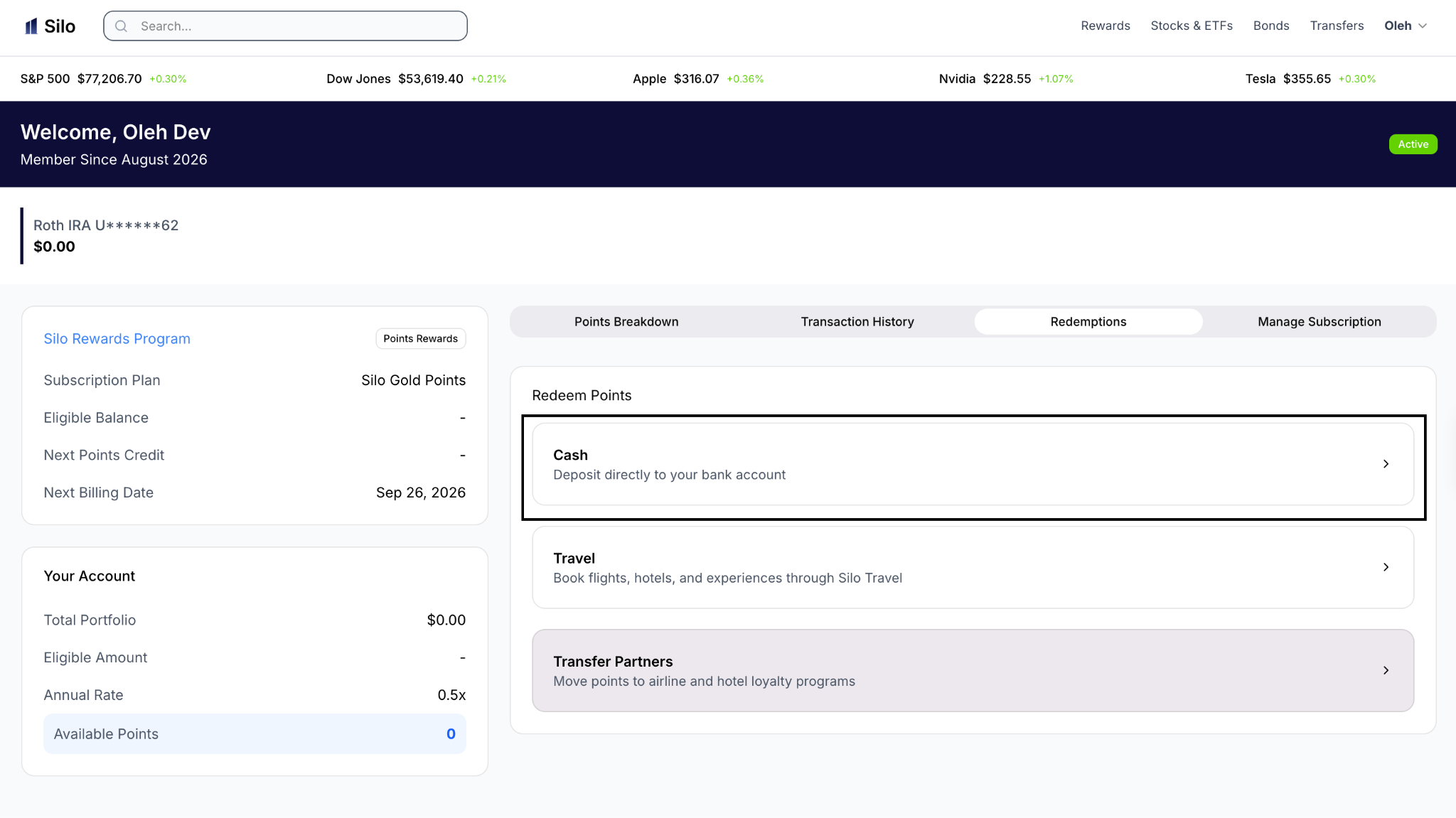
- Choose Cash.
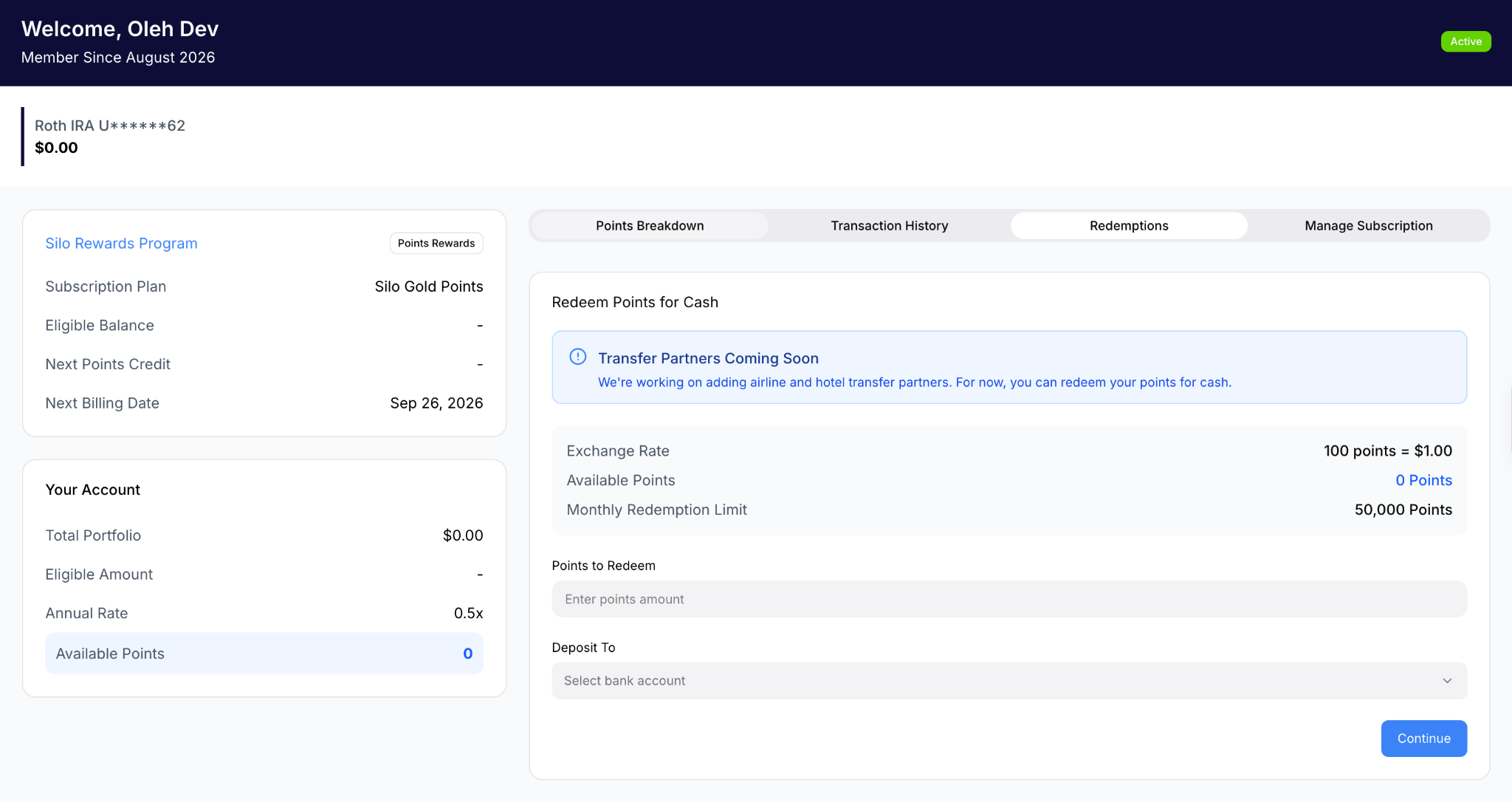
- Select your eligible linked bank account.
- Review your redemption details and submit your request.
Cash redemption requests generally take 3–5 business days to process, although processing times may vary depending on your bank or financial institution.
Cash redemptions require an eligible linked bank account.
3. Are There Limits on Cash Redemptions?
Yes. Monthly cash redemption limits vary by Rewards Membership Tier:
- Blue: Up to 25,000 points per month ($250)
- Gold: Up to 50,000 points per month ($500)
- Platinum: Up to 100,000 points per month ($1,000)
These limits apply specifically to cash redemptions. Other redemption methods, including travel bookings and airline transfers, may have different requirements or limits.
All redemptions are subject to the terms of your applicable Silo Rewards Agreement.
4. How Do I Transfer Points to Avianca LifeMiles?
Silo's first airline transfer partner, Avianca LifeMiles, is now live.
Eligible Silo Rewards members can transfer Silo Points to their LifeMiles account at a 1:1 ratio.
For example:
- 1,000 Silo Points = 1,000 LifeMiles
- 10,000 Silo Points = 10,000 LifeMiles
- 100,000 Silo Points = 100,000 LifeMiles
To transfer points, navigate to the Rewards section of your Silo account, select the available airline transfer option, and follow the instructions to transfer your points to Avianca LifeMiles.
Once transferred, LifeMiles can be redeemed for eligible flights through the LifeMiles loyalty program, including flights operated by Avianca and participating airline partners.
The value of LifeMiles depends on how they are redeemed and is not necessarily equivalent to the 1-cent-per-point cash redemption value offered by Silo.
Airline transfers are subject to applicable eligibility requirements, minimum transfer amounts, processing times, and partner program terms.
5. Is There an Annual Limit on How Many Points I Can Earn?
Yes. Each Rewards Membership Tier has a combined annual point cap covering points earned on eligible stock and ETF holdings and eligible uninvested cash balances.
Under the standard Member Rewards program, annual point caps are:
- Blue: Up to 50,000 points per year
- Gold: Up to 250,000 points per year
- Platinum: Up to 1,000,000 points per year
Eligible stocks and ETFs earn points at an annualized rate of 0.25X across all three membership tiers.
Eligible uninvested cash balances earn points at variable annualized rates of up to 1X for Blue, 2X for Gold, and 3X for Platinum, depending on prevailing market interest rates and applicable Rewards terms.
Both types of earnings count toward the same combined annual point cap.
Promotional bonuses, referrals, and other special Rewards offers may have separate earning limits or exclusions.
Members enrolled under earlier Rewards generations may have different earning rates, eligibility requirements, and annual limits.
You can view your current tier, points earned, and applicable Rewards information in your Silo Rewards dashboard.
6. What Happens If I Reach My Annual Point Cap?
Once you reach your applicable annual point cap, you cannot earn additional standard Rewards points beyond that cap for the remainder of the applicable Rewards period.
For example, a Gold Rewards member can earn up to 250,000 combined annual points from eligible stocks, ETFs, and cash. Once that limit is reached, no additional standard Rewards points will be earned until the next applicable membership period.
Your existing points are not automatically removed when you reach the annual maximum.
Your point-earning limit resets according to your applicable Rewards membership period. The reset may not occur at the beginning of the calendar year.
7. What Happens If My Portfolio Balance Increases or Decreases?
Under the standard Member Rewards program, there is no separate eligible portfolio balance limit. Instead, each membership tier has a combined annual point cap.
If your eligible stock and ETF holdings or eligible cash balance increases, you may earn additional points, subject to your plan's applicable earning rates and remaining annual point allowance.
If your eligible balance decreases, previously accrued points are generally not removed simply because your balance decreased. However, your future points calculations may reflect the lower eligible balance.
Only eligible stocks, ETFs, and uninvested cash balances earn standard Rewards points. Bonds, mutual funds, and other ineligible investments do not earn points, even though they may contribute to your overall portfolio value.
Changes in your eligible holdings due to market movements, deposits, withdrawals, or trades may affect your future Rewards calculations.
Cash earning rates are variable and may change based on prevailing market interest rates, including the federal funds rate.
8. Do My Points Expire?
Silo Points do not expire while you maintain an active Rewards subscription.
If you cancel all of your Rewards subscriptions and your brokerage account is no longer active or in good standing, your unused points remain available for 12 months of inactivity. After that period, unused points expire.
To keep your points active, maintain an eligible Rewards subscription and an active brokerage account in good standing.
9. Why Haven't My Points Appeared Yet?
Points may not appear immediately after completing an eligible transaction or activity. Some points require the underlying transaction or activity to be processed and verified before they are added to your Rewards balance.
Your points may also be affected by:
- Whether your holdings, cash balances, or transactions are eligible.
- Your Rewards Membership Tier.
- The applicable stock and ETF earning rate.
- Changes to the variable cash earning rate.
- Your combined annual point cap.
- Promotional terms or conditions.
- Processing or verification requirements.
- Previous point credits or adjustments.
Not every investment, transaction, or account activity qualifies for points. In particular, bonds, mutual funds, and other ineligible holdings do not generate standard Rewards points.
10. What Should I Do If My Points Are Missing?
If you believe you completed an eligible activity but have not received the expected points:
- Review your Rewards activity and transaction history.
- Check whether the points are still pending.
- Confirm that your holdings, cash balance, transaction, or activity was eligible under your Rewards terms.
- Check whether you have reached your applicable annual point cap.
- If the points remain missing after the applicable processing period, contact Silo Support.
When contacting Support, provide relevant details such as the transaction date, transaction type, and the number of points you expected to receive.
11. How Do I Withdraw Cash From My Silo Account?
Redeeming Rewards points for cash is different from withdrawing funds from your Silo brokerage account.
To withdraw funds from your Silo account, go to the Transfers section, select your eligible linked bank account, enter the amount you want to withdraw, and submit the request.
Funds transferred into Silo generally must be withdrawn back to the original originating bank account. If you attempt to withdraw funds to a different, non-originating bank account, those funds may be subject to a 90-day holding period before becoming eligible for withdrawal to the new account.
Standard withdrawals are processed according to applicable banking timeframes.
12. What Are Silo's ACH Transfer Limits?
Silo has a maximum $100,000 ACH transfer limit across a rolling 7-business-day period. This limit applies cumulatively to incoming and outgoing ACH transfers and is subject to applicable account and transfer requirements.
Eligible accounts may also receive up to $1,000 in instant deposits. Instant deposits may be available for use immediately but remain subject to a standard 4-day settlement hold before the funds can be withdrawn or transferred out of Silo.
13. Where Can I Manage My Rewards and Transfers?
For Rewards and redemptions:
Rewards → Redeem Points
For airline transfers:
Rewards → Select an available airline transfer partner
For deposits and withdrawals:
Transfers → Select your linked bank account → Enter the amount → Submit
All Rewards earnings, redemptions, airline transfers, and account transactions are subject to the applicable Silo Rewards Agreement and partner program terms.
Members enrolled under earlier Rewards generations may have different earning rates, limits, and eligibility requirements.
Step 1: Select Rewards
Step 2: Select, “Redeem Points”
Step 3: Select, “Cash
Step 3: Fill out Information & Submit
13. Where Can I Find the Terms Governing My Rewards?
Rewards earning, redemption options, point limits, eligibility requirements, expiration rules, and other applicable terms are governed by your Silo Rewards Agreement.
Review the agreement applicable to your Rewards Membership Tier for the specific terms that apply to your account.
